

One of the key considerations when making or designing anything is the end user. Who will use the thing and what do they need it to do? For a website, we want to balance giving the user lots of data with making it quick and easy to find the right piece of information. We also want the website to reflect the organisation’s brand and push visitors towards some kind of action, like sending an enquiry or buying an item. With so many goals on even a basic page, we really need some kind of strategy to help us stay on track.
This is where content design comes in.
How is Content Design different from UX?
UX (user experience) looks at every part of how someone uses a website. So, UX research will tell us our audience is mostly on mobile and want to know details like pricing, product features, or our opening hours. We then move to UX design, where we figure out how to organise all the information into themed pages and lead users from one part of the website to another. UX teams often work with user interface (UI) design, where we learn buttons need to be a certain size so it’s easy to click the right one on a touchscreen, or that a certain colour combination from the brand palette is difficult to read and should be avoided.
Content design goes a step further and works out exactly how to present the information using words, visuals, page layouts and other elements to help guide the users through each page. While this does overlap with UX design a bit, content design goes into much more detail about what information goes where and when users should see it.
For example, on an online shop, a UX designer might spend a lot of time working out how to organise the products. They will consider whether the main category should be “Tops” with “T-shirts”, “Sweatshirts” and “Knitwear” being sub-categories, or if it’s better to use “T-shirts & tops” and “Jumpers & Knits” as main categories with no sub-sections. The content designer will look at how those categories and products are presented. They will decide exactly how the wording, images and layout on the homepage can make it easy for customers to find the product they are looking for. On the product page, the content designer will choose how many images are displayed, whether there is a video, where the pricing appears, and how sizing and delivery information is accessed.
Why Do You Need Content Design?
One issue we see all the time is sites with lots of information, but as a user, it’s hard to find what you actually need. Another common problem happens when clients say they already have the copy and images for their new website, so just need a new design. We often have to spend a lot of time editing and reorganising the wording to fit the site design, and don’t always have the right images to go with the text.
Creating masses of content takes effort, which is pointless if users can’t find what they need and give up. It’s also a waste of your time if your website designer can’t use half of it because it doesn’t fit with the flow of the page.
Undertaking even a basic content design review while designing your website ensures you make the right content the first time. It will also make it easier for you to create content which keeps your visitors engaged, improves conversion rates and adds to your brand reputation.
Straightforward Content Design and How to Use It
We always do a very simple form of content design as standard when making wireframes and prototype layouts for a website. By labelling the diagram with the content we expect to see on the finished site, we begin to create a list of content types that need to be made before the site can be launched. This means the content creator (whether that’s the client themselves, or a copywriter/photographer) can focus on the details of language or composition, can see where content can be reused or adapted, and can make sure everything fits into the design, making the whole process quicker, cheaper and easier.
An Example of Basic Content Design
Use a striking image of the event as the background header
Category
Event Name
Interesting/Catchy Sub-Headline
Sum up the event brief and any notable points – e.g. Organise a festival-themed company party for 5000 guests in an off-grid field. 2-3 sentences. (Re-use this as archive extract.)
Key Facts
- Venue/location
- A tricky issue (e.g. a field with no facilities)
- Interesting fact (e.g. 4560m of fairy lights put up)
- Our role (e.g. event prep & management on the day)
- Secondary issue or unusual element
- Another interesting fact
Ready to host your own event? Link to contact page here
In the wireframe above, you can see a template for a case study page for an events company. Case studies are often really important for service businesses, but it can be hard to know what to say, what potential buyers will find interesting, and how to keep the information consistent across lots of different posts. There can also be NDAs or privacy considerations. Therefore, we need to find a way of covering key points without revealing too many details, while also providing space for in-depth content when secrecy isn’t an issue.
Anyone writing a case study to fit this template knows they need to start by summing up the event in 2-3 sentences, and that this introduction will be reused on archive pages, so it should tempt people to click into this event and read more. The content creator can also see that they need a good background image for the header that complements the intro paragraph. There’s space for a fun subheader for the page, as the event category and a plain title convey the main points.
The key facts area gives some guidance, but is deliberately loose so that many different types of event can be fitted in. This wireframe was built for a company that runs large-scale events, so we’ve chosen to leave out pricing as their clients often have extremely healthy budgets to play with. Instead, we’ve suggested that they use this space to highlight their problem-solving skills and drop in any interesting facts or unusual aspects of this event.
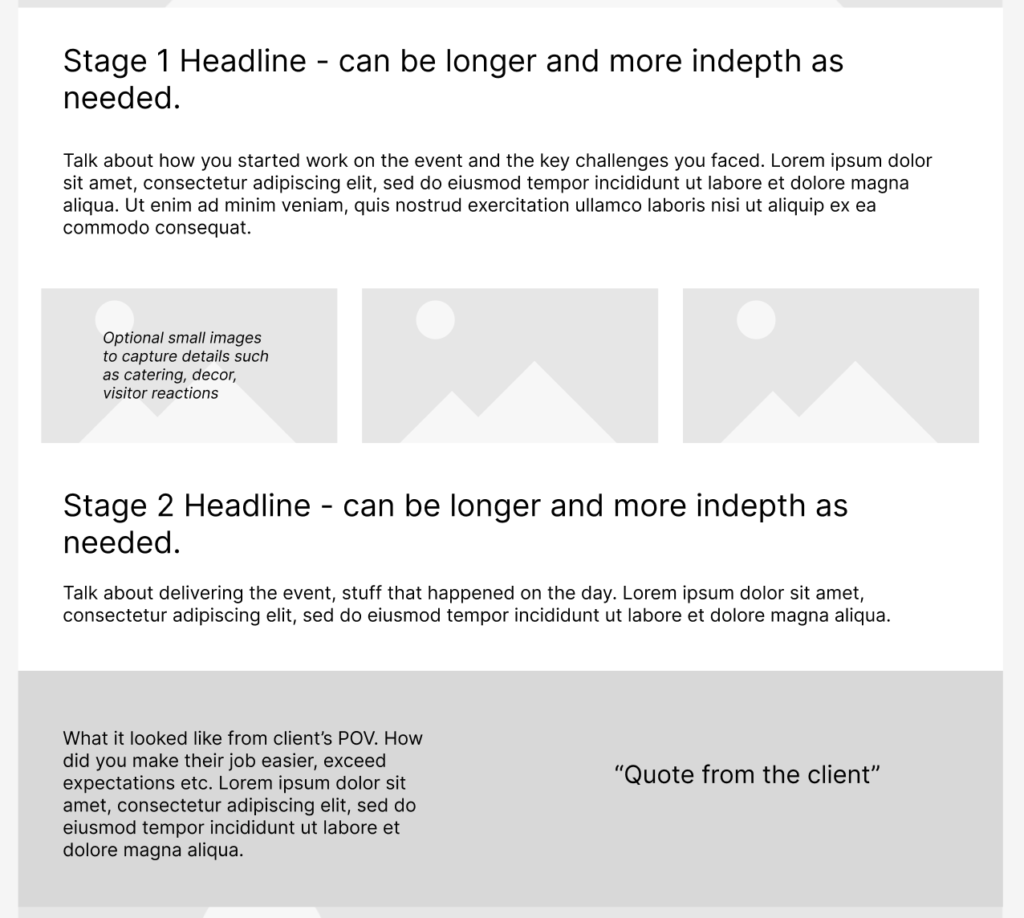
The wireframe template included the whole page, right down to the footer. It showed where to put information about planning and preparing the event, with continued emphasis on the company’s skill at tackling challenging situations and complex logistics. Another section is set aside to talk about delivering the event, because we want to show clients that they can relax and enjoy their day, knowing that the event team has it all under control. There’s an optional gallery element that can be used to show details or reaction photos, as a group of smiling guests or a delicious plate of food further underlines what clients can expect. Lastly, there’s a section dedicated to the case study client, with space to emphasise how the event team worked in partnership with the client, and for a client testimonial.
As a visitor to this page, we can see on the case study archive page that it might be interesting, as the category, event name and introduction show us there are some parallels to what we want to do. As soon as the page loads, we can see whether we’ve come to the right place. The picture inspires us to read more, while the tricky issues and key facts show this company has a proven ability to handle complex events, often covering large areas with many attendees, as well as an eye for detail – something many of their clients are looking for. For some users, this will be enough information, so a subtle link to the contact details allows these visitors to progress without breaking the flow of the page for those who want the more complex and detailed information found lower down.
How to Tell if Your Content Design Needs More Work?
Here’s some key signs that content design might be a problem on your website:
You frequently receive emails and calls asking for basic information that is definitely on your website
Your conversion rate is under 1%
Your homepage gets lots of views but other pages barely get any
Your best selling product or service online is totally different to what sells best when you meet customers in real life and you don’t know why
You get enquiries asking about services or products you don’t offer, such as retail sales when you only do wholesale
All your business comes from referals or social media with almost no leads from your website
All of these scenarios indicate that visitors to your site aren’t able to find the information they need, or that the content is confusing or hard to understand. One of the benefits of a website is reducing the time you need to spend on basic queries, so if you are still having to answer those calls and messages then your website is not functioning on the most basic level, let alone providing real value for your business.
Want Help to Improve Your Website’s Content Design?
Red Spark Digital’s approach combines your real world business goals with user research to create a content design that makes it easy for visitors to engage with your and your offer. If you’re just starting out we can help you build your first website, or we can audit an existing site, pinpointing issues and giving you clear fixes, with implementation if needed. Either way, you’ll have a website that really works for your organisation.
We’d love to discuss your project in more detail, so please send us a message or book in a free intro call.